Turn one classroom into your school's AI Lab
The EduSoulX AI Tab Lab puts locked learning tablets, Munja AI and VidyaUpasna LMS in one room. Every class gets its turn, every student learns on a tablet, and the teacher sees who needs help while the period is still on.
Tap a zone to see where it sits in the lab.
One AI Lab period, 40 minutes
The teacher chooses the class, subject and chapter on the dashboard. Students collect their numbered tablets from the charging wall and log in with their class login.
One lab for the whole school
Classes take turns, like a computer lab. A school of 600 students in 12 classes gives every class three AI Lab periods a week from a single 50-tablet lab.
| P1 | P2 | P3 | P4 | P5 | P6 | |
|---|---|---|---|---|---|---|
| Mon | 3A | 4A | 5A | 6A | 7A | 8A |
| Tue | 3B | 4B | 5B | 6B | 7B | 8B |
| Wed | 8A | 7A | 6A | 5A | 4A | 3A |
| Thu | 8B | 7B | 6B | 5B | 4B | 3B |
| Fri | 5A | 3A | 7A | 4A | 8A | 6A |
| Sat | 5B | 3B | 7B | 4B | 8B | 6B |
Choose your lab size
Every lab is built from pods of 5 students. Start with the size that fits your school today and add pods later.
Starter Lab
- 25 locked EduSoulX tablets
- Munja AI and VidyaUpasna LMS
- Charging wall or trolley
- Wi-Fi setup and teacher training
Standard Lab
- 50 locked EduSoulX tablets
- Munja AI and VidyaUpasna LMS
- Smart charging wall
- Wi-Fi setup and teacher training
- Admin dashboard for management
Campus Lab
- 100 locked EduSoulX tablets
- Two labs, or one lab and an AI Lab on Wheels
- Munja AI and VidyaUpasna LMS
- Wi-Fi setup and full staff training
- Admin dashboard for management
Fixed AI Lab
A dedicated room with pods, the Munja wall, the leaderboard and the charging wall. Classes come to the lab as per the timetable.
AI Lab on Wheels
No spare room? The tablets travel in a lockable charging trolley, and the classroom's own screen becomes the Munja wall.
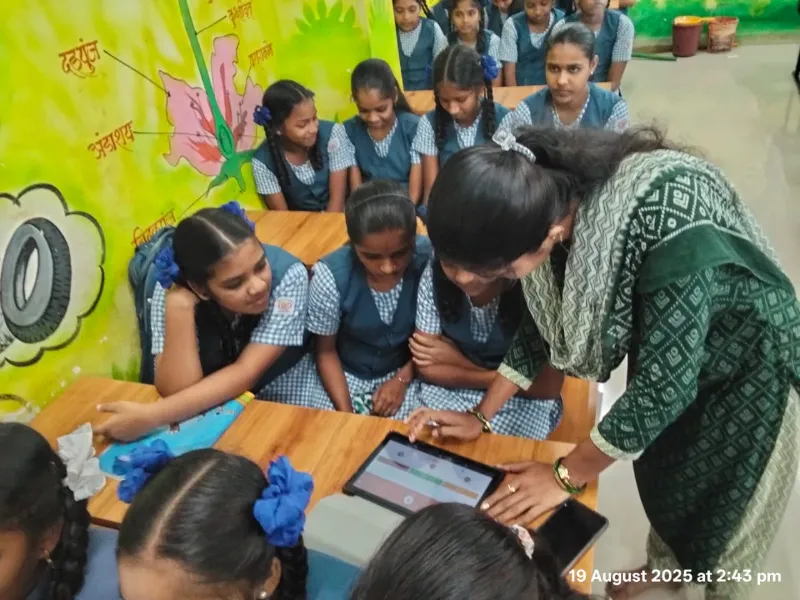
What comes with every lab
- Locked EduSoulX tablets
- 10.1-inch learning tablets. No browser, no social media, the camera is locked, and students cannot install apps or change settings.
- Munja AI inside
- The AI teacher on every tablet. Students ask in simple language and get step-by-step answers.
- VidyaUpasna LMS
- Videos, notes, practice papers and tests for CBSE, ICSE and State Board, checked automatically.
- Secure Wi-Fi
- Set up so that only your lab tablets can connect.
- Class logins and dashboards
- Logins for every class, a dashboard for teachers and one for management.
- Training and support
- Training at your school, then phone and WhatsApp support in office hours.
Ask for the price of your AI Lab
Each school is different, so we prepare the price for your number of students, lab size and room. Fill in a few details and send them to us on WhatsApp.
- Quotation for your students and lab size
- Fixed AI Lab or AI Lab on Wheels
- A free Demo Day before you decide
See the AI Lab with your own students
Our team brings the tablets to your school for one Demo Day and runs a real AI Lab period while you watch.
- Pick a date and a class. Send us a WhatsApp message or call.
- We set up in any classroom in about 30 minutes.
- Your students learn, ask Munja AI and take a quiz.
- You see the report for every student on the teacher dashboard.
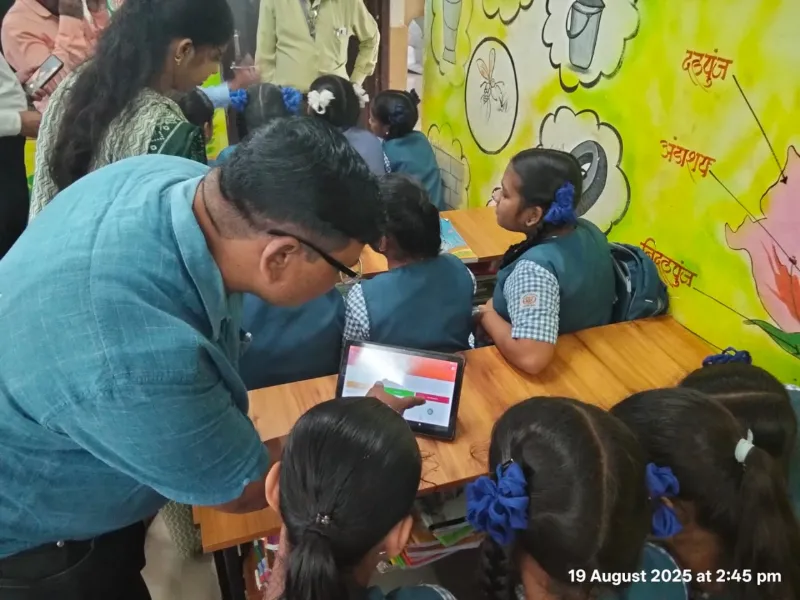
Management sees progress, parents see value
Reports for management
- Weekly lab use by class
- Monthly subject-wise performance
- Student participation
- Teacher activity
- Less paper and less checking work
A monthly report for parents on WhatsApp
Parents see what their child did in the AI Lab every month.
Practice papers done: 9, average score 78%
Strong in fractions. Needs practice in decimals.
Parents who want a tablet at home can buy their own EduSoulX tablet. See EMI for Parents
From first visit to a running lab
Plan
We count your students, classes and periods, check the room, power and internet, and suggest the lab size.
Install
Pods and charging wall set up, tablets numbered and locked, Wi-Fi ready, class logins created.
Train
Hands-on training for your teachers and the AI Lab in-charge, at your school.
Hand over
Every tablet tested, handover signed, and the lab added to your timetable.
Questions schools ask
How many tablets do we need?
Most schools take 25 tablets for up to about 300 students, 50 for about 300 to 600 students and 100 for larger campuses. You can add pods later.
We don't have a spare room. Can we still have an AI Lab?
Yes. Choose the AI Lab on Wheels. The tablets move from class to class in a lockable charging trolley.
Can we use our own projector or smart TV for the Munja wall?
Yes. Any screen in the room that connects to the teacher's device can show Munja AI and the leaderboard.
Who runs the lab every day?
Your school names one teacher as the AI Lab in-charge. We train this teacher and your subject teachers.
Can students misuse the tablets?
No. The tablets are locked for learning: no browser, no social media, the camera is locked, and students cannot install apps or change settings.
Which syllabus is covered?
VidyaUpasna follows CBSE, ICSE and State Board. Teachers can arrange chapters as per their own school calendar.
What support do we get?
Setup and teacher training at your school, phone and WhatsApp support in office hours, remote software help, and repair or replacement under warranty.
What does an AI Lab cost?
It depends on the lab size, the lab type and your room. Ask for price or book a free Demo Day first.
Give your students an AI Lab this year
Book a free Demo Day or ask for your price today.